
Make your images tiny, keep the quality
Tiny Pnger is a desktop app for designers, illustrators and anyone who cares about making image files loading quickly. It's perfect if you have lots of images they want to make smaller. Point it at a folder containing JPG, PNG and WebP files or pick individual images. Set resize options if you want to and choose an output folder on your computer. and it sends every All your images will be compressed using the amazing Tinify API service and saved on your machine, preserving your folder structure, your filenames, and your sanity.
Available for:
You just need a free Tinify Account.
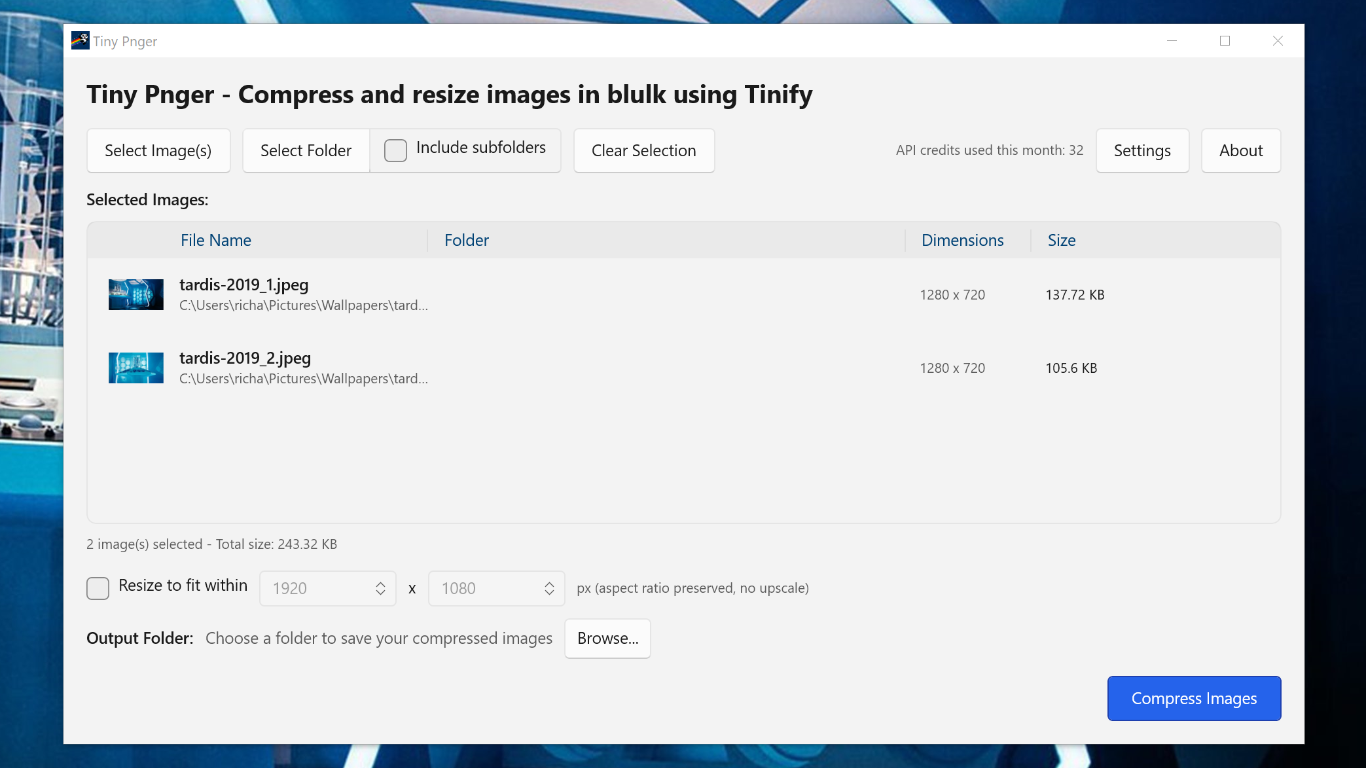
Tiny Pnger makes it easy to work with lots of images and mage them tiny
Easily compress all the images in a project ready for quicker download speeds.
Whole folders, including subfolders
Select individual files or point at a folder and tick Include subfolders. Tiny Pnger keeps the folder layout in your output, so a nested project of assets comes out the other side with the same structure intact.
JPG, PNG and WebP
Mix formats freely in a single run. Each image is compressed in place and written to your chosen output folder with its original filename.
Resize as you compress
Cap images to a maximum size with Fit within bounding box, or use Crop to size for fixed-dimension output with a choice of left, centre or right alignment. Tiny Pnger never upscales — small images are left alone.
Live size savings
Every row shows the new size and percentage saved, with a running total across the whole batch. The Tiny PNG Service gives unparralled file size savings with no visiable loss of image quality.
Sort, inspect, remove
Sort by filename, folder, dimensions or size to find outliers before you run. Right-click any row to drop a single image, or every image from a given folder — handy when you've accidentally pulled in a folder of source PSDs.
Safe by default
Tiny Pnger warns you before overwriting anything in your output folder, lists the files at risk, and makes you confirm. If the folder is non-empty but nothing clashes, it tells you that too.
Cancel and resume
Stop a run at any time and the in-flight image finishes cleanly. Click Compress Images again and it picks up where it left off — already-compressed images are skipped, only the remainder is processed.
Uses the excellent Tiny PNG Service
To use Tiny Pnger you need a free Tinify Account. You will be asked to enter your key. This is never shared with us.
Get Tiny Pnger
Available for:
You'll also need a free Tinify API key — grab one from tinify.com/developers. The free tier covers 500 compressions a month.